MQTT Configuration for AirGradient ONE & Open Air via Dashboard
MQTT Configuration for AirGradient ONE & Open Air via Dashboard
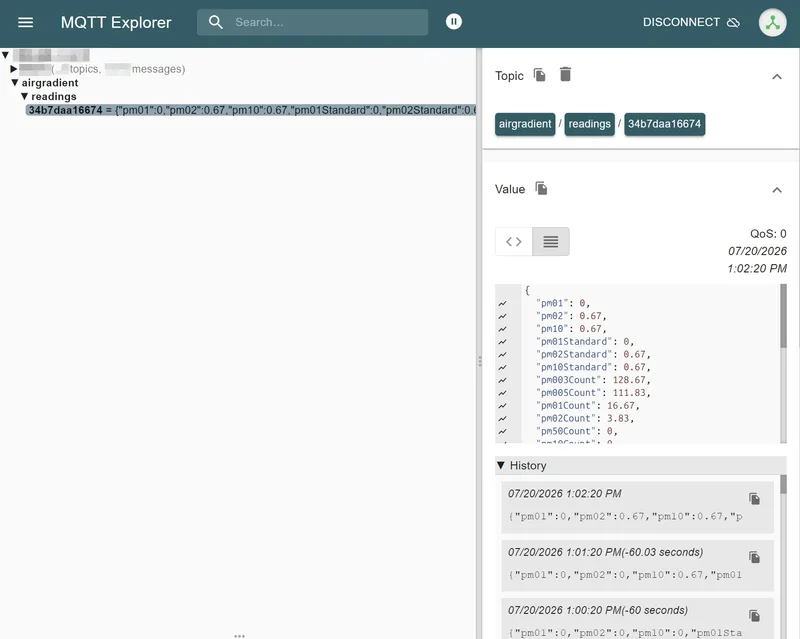
AirGradient ONE & Open Air can send the data not only to the AirGradient Cloud, but also to a local or remote MQTT broker. It publishes a JSON payload every 60 seconds.
The payload is sent under the following Topic: airgradient/readings/{{SENSOR SERIAL NR}}. For example: airgradient/readings/34b7daa16674
Protocol and Payload
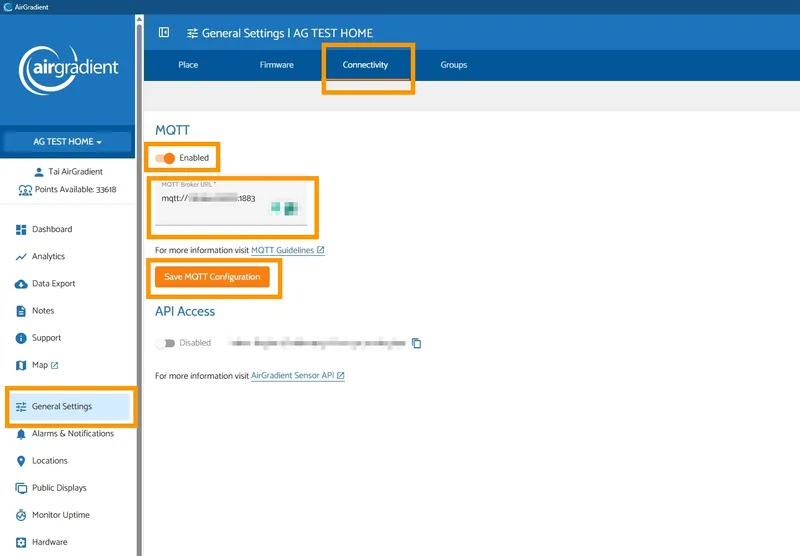
To enable MQTT via the AirGradient Dashboard, go to General Settings > Select 'Connectivity' tab > Toggle MQTT switch to enable > Input your MQTT Broker URL > Click 'Save MQTT Configuration'
If your broker has a username and password it can be set in this pattern mqtts://username:password@my.broker.com:4711/dir
For more information visit: https://docs.espressif.com/projects/esp-idf/en/stable/esp32/api-reference/protocols/mqtt.html
JSON Payload Structure (an example from AirGradient ONE)
{
  "pm01": 0,
  "pm02": 0,
  "pm10": 0,
  "pm01Standard": 0,
  "pm02Standard": 0,
  "pm10Standard": 0,
  "pm003Count": 129.83,
  "pm005Count": 116.17,
  "pm01Count": 18.17,
  "pm02Count": 2.33,
  "pm50Count": 0.33,
  "pm10Count": 0.33,
  "pm02Compensated": 0,
  "atmp": 26.61,
  "atmpCompensated": 26.61,
  "rhum": 42.91,
  "rhumCompensated": 42.91,
  "rco2": 397.33,
  "tvocIndex": 98.83,
  "tvocRaw": 30777.58,
  "noxIndex": 1,
  "noxRaw": 15251,
  "boot": 4,
  "bootCount": 4,
  "wifi": -47,
  "ledMode": "iaqs",
  "serialno": "34b7daa16674",
  "firmware": "3.7.0",
  "model": "I-9PSL"
}
| Parameter | Meaning and unit | Presence |
|---|---|---|
| pm01 | Atmospheric-environment PM1.0 mass concentration, µg/m³. | Valid PM reading |
| pm02 | Atmospheric PM2.5 mass concentration, µg/m³. Despite the name, this means PM2.5, not PM2.0 or PM0.2. | Valid PM reading |
| pm10 | Atmospheric PM10 mass concentration, µg/m³. | Valid PM reading |
| pm01Standard | PM1.0 “standard particle”/CF=1 mass concentration, µg/m³. | Valid sensor reading |
| pm02Standard | PM2.5 standard-particle mass concentration, µg/m³. | Valid sensor reading |
| pm10Standard | PM10 standard-particle mass concentration, µg/m³. | Valid sensor reading |
| pm02Compensated | Corrected PM2.5, µg/m³. It requires valid PM2.5 and humidity. The configured correction is used; with no configured algorithm, MQTT forces the built-in EPA correction. | Valid PM2.5 and RH |
| pm003Count | Particle count at the 0.3 µm threshold, particles per 0.1 L (#/dL). SPS30 does not supply this bin. | Sensor capability and valid reading |
| pm005Count | Particle count at the 0.5 µm threshold, #/dL. | Sensor capability and valid reading |
| pm01Count | Particle count at the 1.0 µm threshold, #/dL. | Sensor capability and valid reading |
| pm02Count | Particle count at the 2.5 µm threshold, #/dL. | Sensor capability and valid reading |
| pm50Count | Particle count at the 5.0 µm threshold, #/dL. Normally available from the indoor PMS5003, not PMS5003T. | Supported/populated bin |
| pm10Count | Particle count at the 10 µm threshold, #/dL. Normally available from PMS5003; a single-channel SPS30 configuration can also emit it. | Supported/populated bin |
| atmp | Uncorrected temperature in °C. On ONE it comes from SHT; on Open Air it normally comes from PMS5003T. SPS30 does not provide temperature. | Valid temperature |
| atmpCompensated | Corrected temperature in °C. On ONE it may equal atmp when no correction is configured; Open Air MQTT forces its standard PMS5003T correction when configured as none. | Valid temperature |
| rhum | Uncorrected relative humidity in percent. ONE uses SHT; Open Air normally uses PMS5003T. | Valid humidity |
| rhumCompensated | Corrected relative humidity in percent. It may equal the raw value on ONE when no correction is configured. | Valid humidity |
| rco2 | Senseair S8 CO₂ concentration in ppm. | S8 detected and reading valid |
| tvocIndex | Dimensionless Sensirion VOC Gas Index calculated from SGP41 data. | SGP41 detected and reading valid |
| tvocRaw | Raw SGP41 VOC signal/ticks. This is not a ppb concentration. | SGP41 detected and reading valid |
| noxIndex | Dimensionless Sensirion NOx Gas Index. | SGP41 detected and reading valid |
| noxRaw | Raw SGP41 NOx signal/ticks, not a ppb concentration. | SGP41 detected and reading valid |
| boot | Counter since the current reboot. More precisely, v3.7.0 increments it before each enabled Wi-Fi cloud-post attempt; MQTT itself does not increment it. | Always |
| bootCount | Exact duplicate of boot, retained as a compatibility alias. | Always |
| wifi | Monitor Wi-Fi RSSI in dBm. A value nearer zero indicates a stronger signal. | Always |
| ledMode | Current ONE LED-bar mode: off, pm, co2, or iaqs. | AirGradient ONE only |
| serialno | Monitor device ID: normally the lowercase, colon-free Wi-Fi MAC-derived identifier. It is also used in the MQTT topic. | Always |
| firmware | Main device firmware build string. An official clean release reports 3.7.0. | Always |
| model | Runtime-detected hardware/sensor configuration. | Always |
| channels | Per-sensor measurements under keys "1" and "2". Used for dual-PM Open Air configurations. | O-1PP and O-1PPT |
| satellites | Optional map keyed by colon-free BLE satellite MAC. Each child contains atmp, rhum, and wifi; the child wifi is actually BLE RSSI in dBm. | Satellite support enabled and fresh data available |
Product-Dependent Shape
- I-9PSL AirGradient ONE: flat payload, normally including PM, SHT temperature/humidity, CO₂, VOC/NOx, and ledMode.
- O-1PST one PM channel, CO₂, and VOC/NOx: flat payload.
- O-1PPT two PM channels and VOC/NOx: top-level aggregate plus channels.
- O-1PP two PM channels: top-level aggregate plus channels.
- 0-1PS one PM channel and CO₂: flat payload.
- O-1P one PM channel only: flat payload.
For dual-channel models, each top-level measurement is the average of channels 1 and 2 when both are valid. If only one is valid, the top-level value falls back to that channel.
Important Behavior
- Missing or invalid sensor readings are omitted completely. There are no
nullplaceholders. - Measurements are rolling averages covering approximately the last 12 seconds, then rounded to at most two decimal places. They are not 60-second averages, even though MQTT publishes every 60 seconds.
- SPS30 has no atmospheric-versus-standard distinction, so firmware v3.7.0 puts the same SPS30 mass values into both sets of PM fields.
- MQTT does not contain cloud-only
resetReason,freeHeap, or PM-sensor firmware fields. - There is no timestamp or unit field.
- It uses the same JSON generator as the local endpoint
GET /measures/current.