Understanding the LED Indicators on Your AirGradient ONE
Understanding the LED Indicators on Your AirGradient ONE
The AirGradient ONE has a row of 11 LEDs behind the plastic at the top of the device. These LEDs convey important information to the user - namely, monitor status and pollutant concentrations. They can be split into two groups.
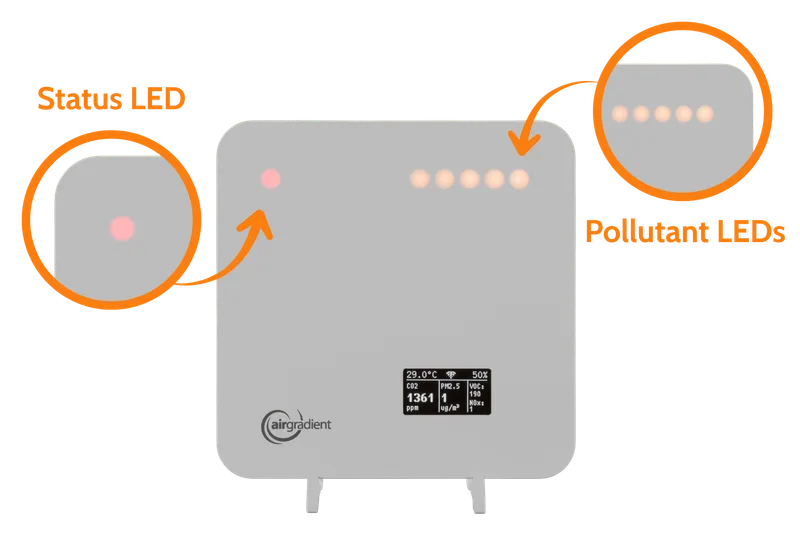
Top-left LED: This is a single LED in the device’s top-left corner. It is typically off but will turn on when the monitor encounters an issue.
LED bar (beginning in the top-right corner): This bar of nine LEDs starts at the top-right corner of the device and moves left. The more LEDs that turn on, the worse the air quality is.
It’s worth noting that despite the device having 11 LEDs, only 10 will turn on at any given time (up to nine for pollutant concentration and one separate LED for monitor status). However, most of the time, you will only see a few LEDs on the device.
Let’s discuss how you can interpret the LEDs across the top of your AirGradient ONE.
Pollutant LEDs
These are the LEDs that start at the top-right corner of the device and spread to the left as the air quality deteriorates.
Under the device settings on your dashboard, you can also change the LEDs to instead show PM2.5 concentrations.
See more details here: Control the LEDs and Display on the AirGradient ONE
Status LEDs
LED Test
When the device is first booted, or as requested through Home Assistant or the web dashboard, an LED test can be performed. This test will light all of the LEDs so the user can ensure they are working. This is the only time (with normal firmware) that all eleven LEDs will turn on.