AirGradient Open Air Max: Maintenance and Repair
AirGradient Open Air Max: Maintenance and Repair
Maintenance Overview
The Open Air Max is designed for outdoor durability and minimal maintenance, but occasional inspection helps maintain good performance.
Choose an installation location that allows safe access for cleaning and inspection.
Cleaning the Enclosure and Vent
Periodically inspect the grey sensor intake vent at the bottom of the monitor.
If dust or debris is visible:
Clean gently with a soft brush or compressed air.
Do not use water or cleaning agents directly on or inside the vent.
Do not spray liquid into the sensor vent.
Keeping the sensor vent clear helps maintain airflow to the sensors.
Cleaning the Solar Panel
If the solar panel surface is dirty, dusty, or covered with residue, wipe it gently with a soft cloth or tissue.
Keeping the solar panel clean is important for reliable solar charging, especially in dusty environments.
If the device starts dropping offline during cloudy weather or low-light periods, check whether the solar panel is dirty or shaded.
PM Sensor Cleaning
Cleaning the internal PM sensor is not part of routine maintenance.
Only consider PM sensor cleaning if the dashboard flags abnormal PM readings, such as values that are consistently zero, unexpectedly high, or erratic.
As a first step, try blowing compressed air through the bottom vent. If the issue continues, contact AirGradient support.
Sensor Replacements
The Open Air Max has a modular design, so components can be replaced when needed.
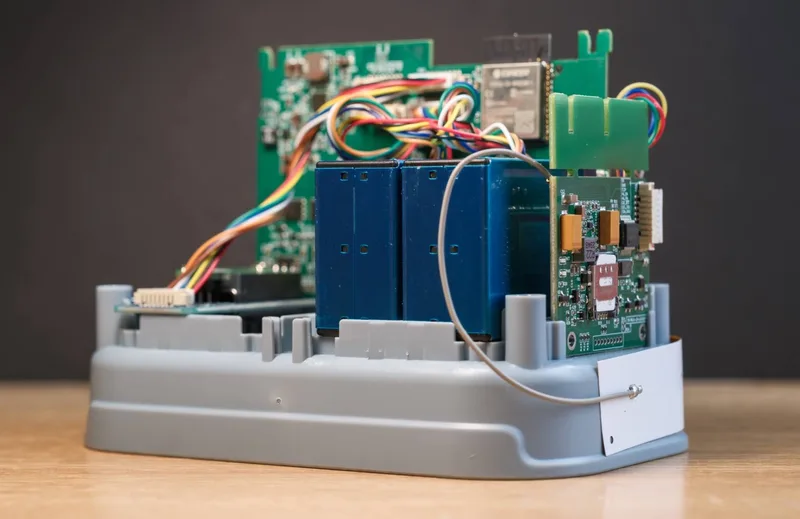
NO2 and O3 sensors
The O-M-1PPSTON variant includes NO2 and O3 sensors.
These electrochemical sensors have a finite lifespan of around two years. We recommend replacing them every two years if possible. If they are not replaced, accuracy will gradually deteriorate.
PM Sensors
PM sensors usually last around three to five years before needing replacement.
If the two PM modules provide significantly different results, one sensor may need replacement. However, PM sensors can often continue working for many years, so replacement is only recommended when there is an obvious issue.
Opening the Device
Only open the Open Air Max when needed.
Before opening:
- Turn the device off.
- Disconnect USB-C power if connected.
- Disconnect the solar panel cable.
- Work in a clean, dry area.
- Keep screws and parts in a safe container.
Tools Needed
You will need a Torx T6 screwdriver with a long, narrow head.
Opening Steps
Remove the four screws on the bottom of the device.
Keep the screws in a safe container.
With the device upright, slide the white cover upward away from the base.
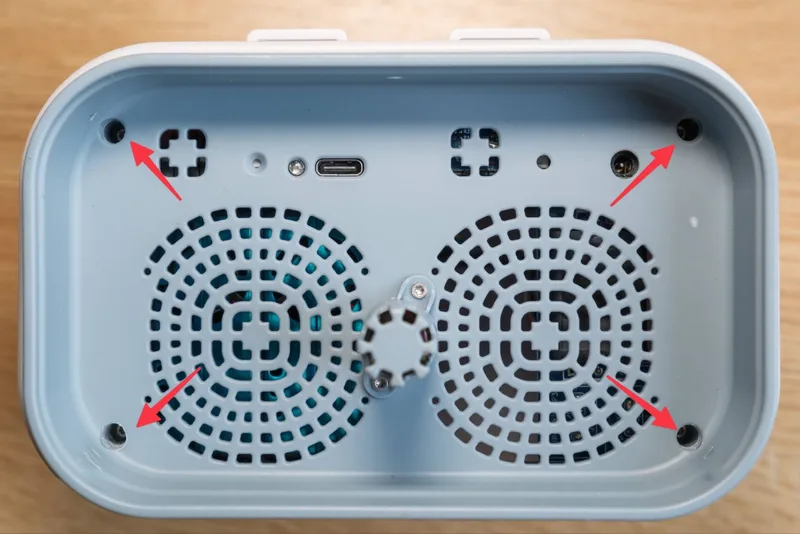
Do not pull the base downward away from the white cover, as this can put pressure on the internal components.
Once opened, components can be replaced by unscrewing them if needed and unplugging the ribbon cable.
When installing a replacement component:
- Place it in the same position.
- Connect the ribbon cable in the same orientation.
- Make sure all cables are seated securely before closing the enclosure.