AirGradient Open Air Max: Troubleshooting
AirGradient Open Air Max: Troubleshooting
The device powers from USB-C but stops when USB is removed
- The battery power switch is probably OFF.
Turn the battery power switch ON so the device can run from battery backup. See this video for guidance.
- Check that three 18650 batteries are installed inside the monitor and seated securely in their holders.
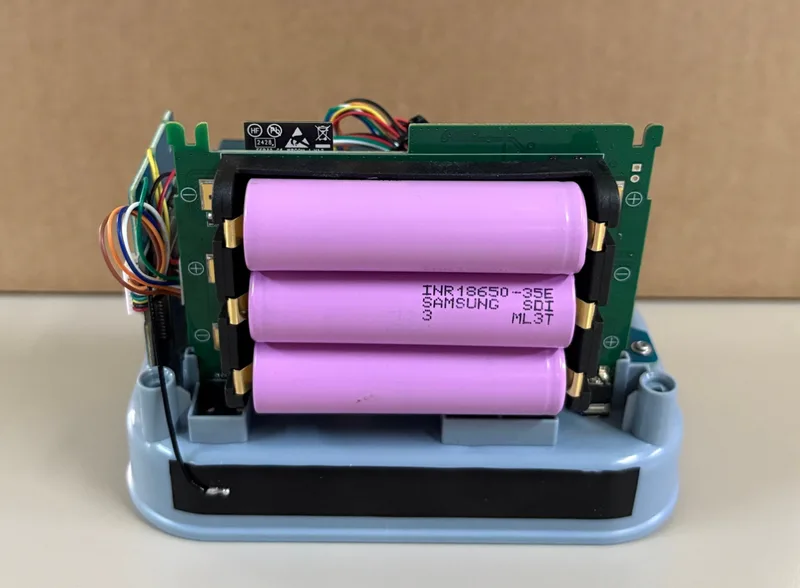
See AirGradient Open Air Max: Maintenance and Repair for instructions on how to open the unit.
The batteries do not charge from USB-C
Make sure the battery power switch is ON. See this video for guidance.
USB-C will not recharge the batteries if the battery power switch is OFF.
The monitor is not reporting data
Try the following:
- Confirm that the device is powered on.
- Check for a status LED indication or pattern.
- Make sure there is cellular coverage at the location.
- Wait at least 15 minutes after startup.
- If using WiFi, confirm that the monitor is connected to the correct network.
- Check battery voltage and solar panel voltage in the dashboard if advanced parameters are enabled.
- If you installed a local SIM card, confirm that the correct APN has been entered. See Change the APN for a Local SIM Card.
The device shows a network connection failure
If the status LED shows slow blink x5, the device has a network connection failure.
Try the following:
- Check 4G coverage at the installation location.
- Test with a smartphone at the same location.
- Move the monitor temporarily to a location with stronger signal.
- Wait for the monitor to retry automatically.
- If cellular coverage is not available, switch the device to WiFi.
If you are using your own SIM card, confirm that its APN is correct. See Change the APN for a Local SIM Card.
The device drops offline periodically
Check whether the solar panel receives enough direct sunlight.
Try the following:
- Clean the solar panel.
- Check for shade from trees, buildings, poles, or other objects.
- Confirm that the solar panel cable is connected securely.
- Consider a second solar panel in low-sunlight locations.
- Use USB-C power if solar power is not sufficient.
PM readings look abnormal
If PM readings are consistently zero, unexpectedly high, or erratic:
- Check whether the sensor intake vent is blocked.
- Gently clean the vent with compressed air.
- Do not spray water or cleaning agents into the vent.
- Contact AirGradient support if the issue continues.