Where do I access the API documentation, API token, and Local API?
Where do I access the API documentation, API token, and Local API?
API documentation
Open the AirGradient API documentation.
This lists the available endpoints, required parameters, and response formats. It also lets you inspect and test supported requests.
The API can provide measurements such as PM2.5, temperature, and CO2. Some endpoints can also provide limited historical data or data from public outdoor monitors.
Open indoor air quality data
AirGradient's opt-in indoor air quality dataset is available through the public AirGradient Map API. It is separate from access to your private Dashboard data and does not require your Dashboard API token. See Access AirGradient's Open Indoor Air Quality Data for the endpoints, available measurements, privacy protections, and research limitations.
Find your API token
The API token is used for API requests that require authentication. This is for endpoints that return private and not publicly shared data.
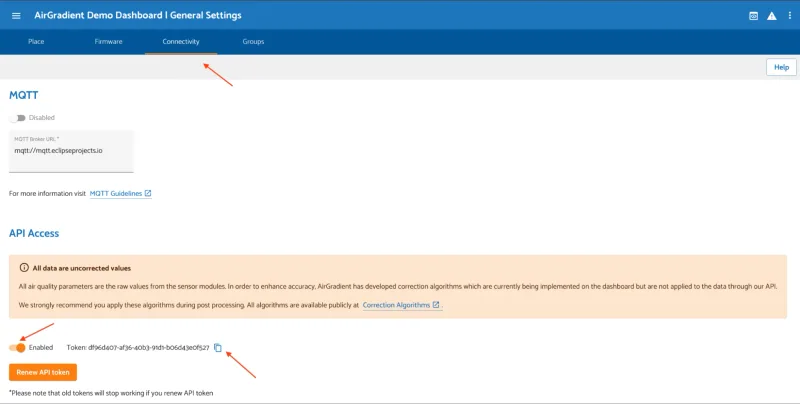
- Open the AirGradient Dashboard.
- Open General Settings.
- Select the Connectivity tab.
- Enable API access.
- Copy the API token shown by the dashboard.
You can open the Connectivity settings directly at Connectivity settings.
Treat the API token like a password. Do not share it in screenshots, public repositories, source code, or client-side applications.
Find the Location ID
Some API endpoints require a Location ID. The Location ID identifies the dashboard Location connected to a monitor. It is different from the Location name.
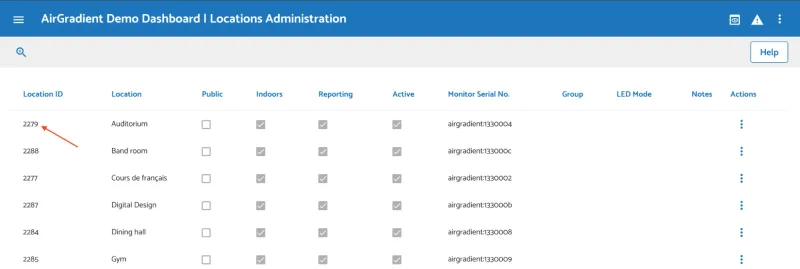
To find it:
- Open the dashboard's Locations Administration page.
- Find the Location connected to your monitor.
- Copy the Location ID shown in the first column.
Use the Location ID, rather than the Location name, when an API endpoint asks for it.
How the Local API works
The Local API connects directly to a monitor over your local network. It does not use the AirGradient cloud and does not require a dashboard API token.
Before you start:
- the monitor must be connected to WiFi
- the computer or phone making the request must be on the same WiFi network
- you need the monitor's serial number, shown on the back of the monitor
Get the latest measurements
Open a browser or make an HTTP request to:
http://airgradient_SERIAL_NUMBER.local/measures/current
Replace SERIAL_NUMBER with the serial number of your monitor. For example:
http://airgradient_aaaaaaaaaaaa.local/measures/current
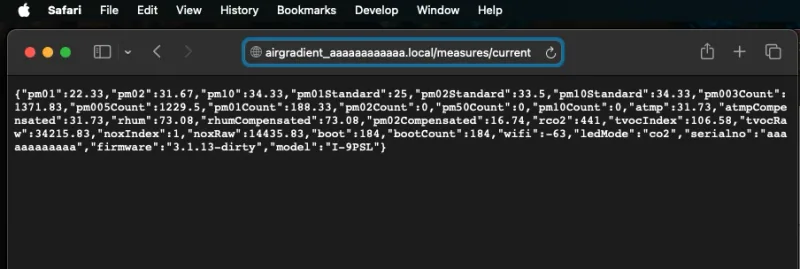
The monitor returns the latest measurements in JSON format.
Get the monitor configuration
To retrieve the monitor's local configuration, use:
http://airgradient_SERIAL_NUMBER.local/config
For example:
http://airgradient_aaaaaaaaaaaa.local/config
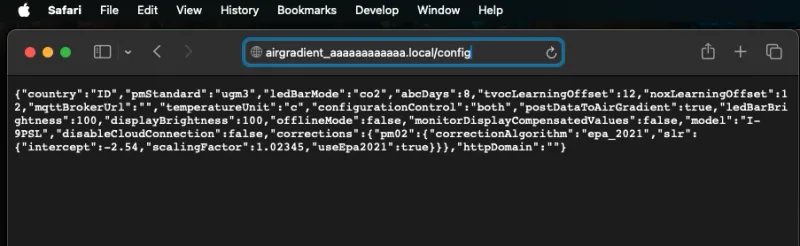
For additional Local API endpoints and implementation details, see the Local Server Documentation.
Which API should I use?
| API | Use it when... | API token required? |
|---|---|---|
| Public API | You want cloud data, public monitor data, or data from outside the local network. | For endpoints that require authentication. |
| Local API | You want direct access to a monitor on the same WiFi network. | No. |